Mounting wireless Apple CarPlay and Android Auto on your dashboard, the Uniden iGO Play 10+ is an easy way to pimp your ride for the digital age.
Most of us can’t afford to buy a new car every few years just to upgrade to the latest and greatest infotainment system. Instead, the simplest way to give your ride a smart overhaul is to mount your smartphone in a cradle – keeping in mind that the law is very strict about touching your phone whilst driving.
Of course, if you want the benefit of a larger screen, then you either need to replace your car stereo’s head unit or else mount a separate touchscreen on the dashboard. That’s where the $249.95 Uniden iGO Play 10+ touchscreen comes in, attaching to the dash and connecting wirelessly to your smartphone, so you can enjoy access to Apple CarPlay or Android Auto while you’re behind the wheel.
Table of contents
Uniden iGO Play 10+ first impressions
With a massive 10.26-inch touchscreen display, the Uniden iGO Play 10+ ensures you have plenty of screen real estate at your disposal when you hit the road.
At first glance, the screen is large enough to be a double-DIN head unit, designed to replace the front panel of your existing car stereo. But that’s not the case; look at the rear, and you see it has slots for attaching it to the supplied dashboard mount.
It takes a bit of force to attach the screen to the mount, with a satisfying click. Once attached, you can slightly adjust the height, but not the horizontal or vertical tilt. It’s a shame that it doesn’t feature a more flexible ball joint, like those found on most smartphone cradles, perhaps due to the size and weight of the screen.
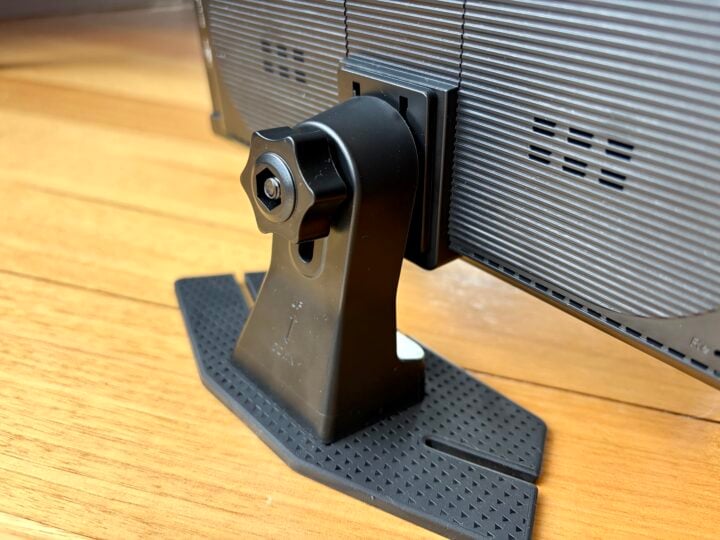
Uniden supplies two double-sided sticky pads for attaching the base of the cradle to the dashboard of the car, which do a decent job but don’t lend themselves to regularly removing the screen, such as switching between cars.
The screen is a little front-heavy when on the mount, which is fine if your dashboard is flat, but could be a problem if your dashboard leans forward on a steep slope.
Keep in mind, the mount is not flexible enough to attach to the windscreen, roof or aircon vent, which limits your placement options. Also, the sheer size of the unit means it might be a tight fit in very small cars.
The screen is designed to be mounted sideways in landscape mode, but unlike some in-car smart screens, like the cheaper Laser Navig8r, it lacks a hood across the top to shade it from the sun, so you might run into issues with glare on a bright day.
Unfortunately, it is a very glossy display which doesn’t seem to have an anti-glare coating. As such, it’s frustrating that you can’t easily tilt it whilst on the move to reduce glare and reflections.
To help with visibility, you can adjust the screen’s brightness, contrast and saturation, but you can’t overcome the fact that it’s a rather mediocre display. If you pump the brightness too high, the image becomes so washed out that you lose the detail in the maps.

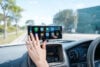
At the default brightness, the screen has plenty of detail, but it looks rather dim on a brightly lit day. My in-car photos (above) are deceptive. I’ve had to edit them to max out the brightness, so you can clearly read the screen, and you can see how it’s blown out the sky and trees in the background.
When it comes to power, the unit features a USB-C port on the back. You can connect it directly to a USB port in your car or, more likely, if you have an older car, plug it into the cigarette lighter using the supplied 3.3-metre cable.
A USB-C connector also means you can power up the Uniden iGO Play 10+ using a smartphone charger. This means you can set it up from the comfort of your dining room table, rather than sitting behind the wheel. It’s a welcome improvement for those of us who have spent many years sitting in the driveway testing in-car tech.
As for audio, the screen has an underwhelming built-in rear speaker, which the menus confusingly refer to as “local horn”. If you want to play the audio through your car’s speakers, you can use the supplied 3.5 mm audio cable to connect the screen to your car stereo’s auxiliary input (assuming it has one).
Alternatively, you can connect to the car via Bluetooth or use the screen’s built-in FM transmitter and tune your car radio to the broadcast. You get the best sound quality using a 3.5 mm cable, but in the end, convenience will likely outweigh audio quality.
There’s also a microSD slot for playing stored music rather than streaming from your phone.
Finally, you can connect an optional reversing camera at the rear of your car, but there isn’t a camera built into the back of the Uniden iGO Play 10+, so you can’t use it as a dashcam.

Uniden iGO Play 10+ specifications and price
| Display size | 10.26-inch |
| Display resolution | 1600 x 600 pixel |
| Display technology | IPS LCD touchscreen |
| Compatibility | Wireless Apple CarPlay and Android Auto |
| Connectivity | FM transmitter 3.5mm aux output AV in for optional reversing camera Bluetooth and Wi-Fi |
| External storage | microSD |
| Power | USB-C via supplied 12V car cigarette lighter adaptor |
| Dimensions | 245 mm W x 120 mm H x 80 mm D (including mount) |
| Weight | 460 gm (including mount) |
| Price (RRP) | $249.95 |
| Warranty | 1 year |
| Official website | Uniden Australia |
Features
Connecting your Apple or Android smartphone wirelessly to the Uniden iGO Play 10+ is pretty straightforward, after which you have access to navigation, music, calls, messaging and other handy features.
Support for both major smartphone platforms is great if your household has multiple drivers with different brand phones.
Connecting your smartphone via Bluetooth is simple, plus in the background, it also takes advantage of Wi-Fi to support the extra bandwidth of the full CarPlay or Android Auto wireless experience.
At this point, you can use the touchscreen to access most of the compatible maps, streaming audio and communication apps on your smartphone.
Thankfully, you’re not limited to using your smartphone’s default navigation app. When you launch a navigation app, it takes advantage of the extra-wide display to show more of the world around you – although it’s a bit frustrating if you’d rather see more of what’s ahead rather than off to the sides.
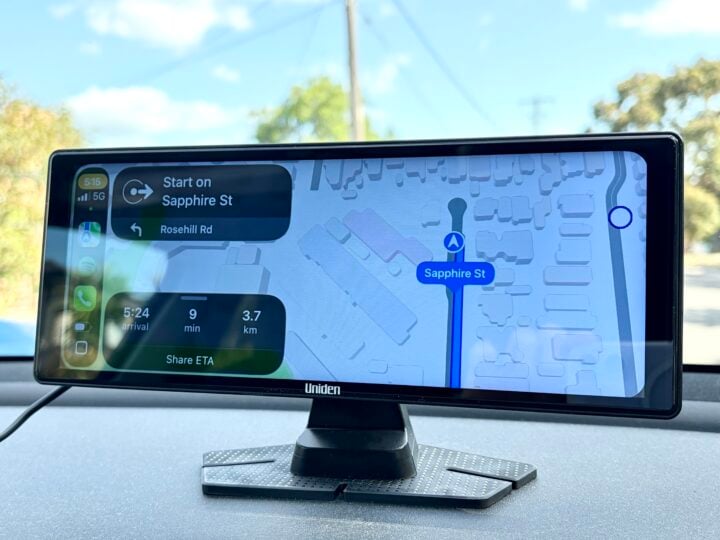
You can also talk directly to your smart assistant. For example, iPhone owners ask Siri general queries, or issue commands such as “navigation to the nearest McDonald’s”, which launches Apple Maps.
Unfortunately, the built-in microphone offers very disappointing sound quality for people on the other end when you make a hands-free call.
There’s also support for iPhone and Android screen mirroring, with the ability to launch this by default rather than CarPlay or Android Auto.
Getting screen mirroring to work can be a bit finicky, and the results can be hit-and-miss depending on apps – for example, Netflix and Disney on an iPhone don’t want to stream video. Even with compatible screen mirroring apps, you probably need to turn your smartphone sideways to see the image in large landscape mode on the Uniden screen.
Who is the Uniden iGO Play 10+ for?
If you want access to wireless Apple CarPlay or Android Auto behind the wheel of an old car, the Uniden iGO Play 10+ is a very tempting option – assuming the hefty 10.26-inch display isn’t too large for your dashboard.
It’s just a shame that Uniden hasn’t opted for a better quality screen so you can pump up the brightness without losing too much fine detail. Or at least added a screen hood, anti-glare coating or a more adjustable mount to help combat screen glare.